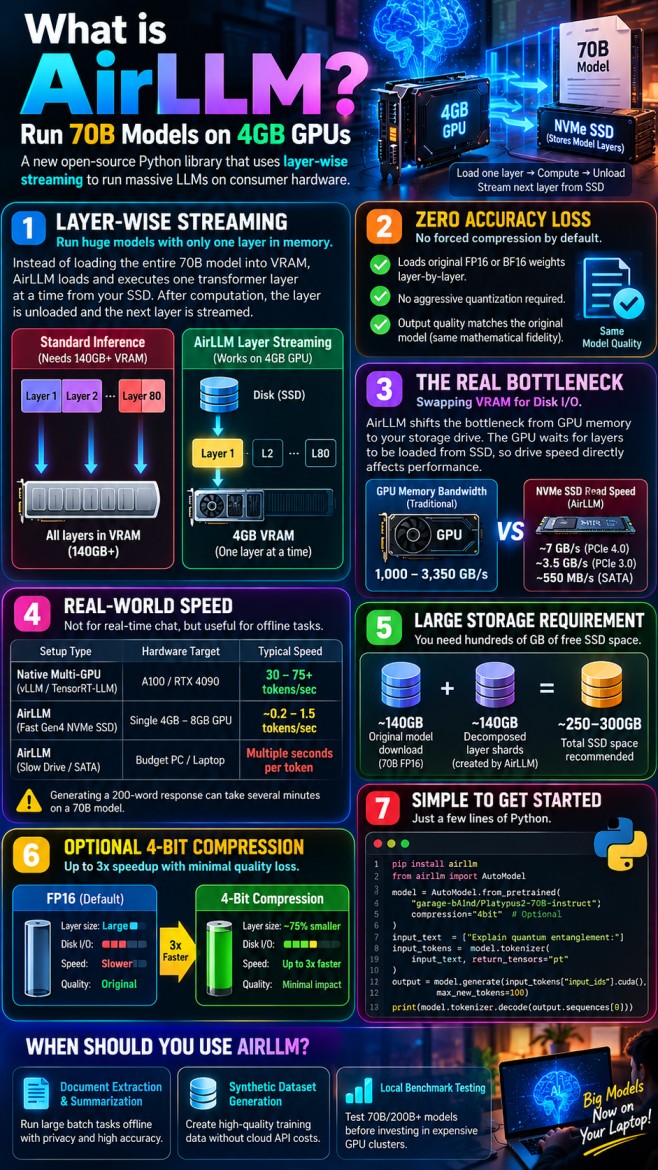
Running a 70-billion-parameter open-weights model locally typically requires two high-end enterprise GPUs or an expensive multi-card rig equipped with at least 140GB to 160GB of pooled VRAM in 16-bit precision. Even with 4-bit quantizations like GGUF or AWQ, you still need roughly 40GB of memory just to load the weights into memory.
Then comes AirLLM—an open-source project by Gavin Li that makes a bold and intriguing claim: you can run full-scale 70B models (and even massive trillion-parameter Mixture-of-Experts checkpoints) on consumer cards with as little as 4GB of VRAM.
Is it an impossible breakthrough in compression, or is there a major architectural catch? Here is an objective, under-the-hood breakdown of what AirLLM is, how it bypasses physical hardware limits, the speed trade-offs involved, and what you must know before testing it on your own machine.
Official Open-Source Repository
This technical evaluation is based on the official open-source repository created and maintained by Gavin Li. You can review the underlying source code, layer decomposition scripts, benchmarks, and community discussions directly on GitHub.
Visit lyogavin/airllm on GitHub1. The Core Mechanic: Layer-Wise Streaming
Traditional inference architectures—such as vLLM, TensorRT-LLM, and standard Hugging Face Transformers—load the entire neural network into GPU memory before running the first token. If the model size exceeds your total VRAM, the runtime immediately crashes with a CUDA Out of Memory (OOM) error.
AirLLM circumvents this barrier by taking advantage of a fundamental property of transformer architectures: execution is strictly sequential.
Standard Inference Architecture:
[ Layer 1 + Layer 2 + ... + Layer 80 ] ====> All 140GB forced into VRAM at once

AirLLM Layer Streaming Pipeline:
[ NVMe Disk ] ──Stream Layer 1──► [ 4GB VRAM ] (Compute Forward Pass) ──► Free Layer 1
[ NVMe Disk ] ──Stream Layer 2──► [ 4GB VRAM ] (Compute Forward Pass) ──► Free Layer 2
[ NVMe Disk ] ──Stream Layer 3──► [ 4GB VRAM ] (Compute Forward Pass) ──► Free Layer 3
The execution pipeline proceeds step by step:
- The input tokens pass into Layer 1.
- Layer 1 executes the forward pass on the GPU and outputs an intermediate hidden state tensor.
- Layer 1 is immediately unloaded from VRAM to clear memory.
- Layer 2 is streamed from your local disk into VRAM to process that hidden state.
- This sequence repeats sequentially through all 80+ layers of the model.
Because only a single transformer layer resides in memory at any given millisecond, peak VRAM usage scales with the size of one individual layer (~1.6GB to 2GB in a typical 70B architecture) rather than the cumulative 140GB weight matrix.
2. Zero Accuracy Degradation (Unlike Standard Quantization)
When developers attempt to squeeze large models onto smaller hardware, the standard path is aggressive quantization—compressing 16-bit weights down to 4-bit, 3-bit, 2-bit, or experimental 1.58-bit representations. While quantization significantly saves memory, extreme bit-depth reductions can degrade model perplexity, introduce reasoning errors, and cause subtle hallucination loops in complex coding or mathematical logic.
AirLLM does not compress or prune the model weights by default. It loads and computes the unadulterated FP16 or BF16 weights layer-by-layer. The outputs and hidden state tensors generated by a 70B model running through AirLLM match the mathematical fidelity of the same model running across an $8\times\text{A100}$ enterprise data-center cluster.
3. The Bottleneck Trade-Off: Swapping VRAM for Disk I/O
AirLLM does not break the laws of computer science; it simply shifts where the physical bottleneck lives.
In standard GPU inference, model weights are transferred over high-speed GPU memory buses offering between 1,000 GB/s to 3,350 GB/s of ultra-wide memory bandwidth. With AirLLM, your GPU compute cores spend most of their time waiting on your storage drive:
- PCIe 4.0 NVMe SSD: Peaks at ~7 GB/s sequential reads.
- PCIe 3.0 NVMe SSD: Peaks at ~3.5 GB/s sequential reads.
- SATA SSD: Tops out at ~550 MB/s sequential reads.
Because the runtime must load tens of gigabytes of layer shards from disk over and over again for every single token generated during the autoregressive decode phase, your drive throughput directly dictates your execution speed.
4. The Speed Reality: Fractions of a Token per Second
The question every developer asks is: How fast does it actually generate text?
AirLLM is fundamentally not designed for conversational chat, autocomplete, or real-time streaming interfaces. Here is how it compares across different hardware environments:
| Setup Type | Hardware Target | Typical Output Speed |
| Native Multi-GPU (vLLM / TensorRT-LLM) | 2x A100 (80GB) or 4x RTX 4090 | 30 – 75+ tokens/sec |
| AirLLM (Fast Gen4 NVMe SSD) | Single 4GB–8GB GPU (e.g. RTX 3050 / GTX 1650) | ~0.2 – 1.5 tokens/sec |
| AirLLM (Slower Drive / SATA SSD) | Budget PC / Older Laptop | Multiple seconds per token |
For dense 70B models, producing a 200-word response can take several minutes. Attempting to hook AirLLM up as a drop-in backend for a conversational web UI will result in unusable latency. However, for non-interactive asynchronous jobs, speed is often secondary to accessibility.
5. Storage Space Requirements Can Surprise You
While your graphics card only needs 4GB of VRAM, your hard drive needs substantial free capacity. Before inference begins, AirLLM splits and transforms the original Hugging Face model checkpoint into discrete layer files.
During this initial preparation step:
- You must store the raw model download (~140GB for a standard 70B FP16 model).
- You must accommodate the newly created decomposed layer shards (~140GB).
Unless you clean up the original raw files or specify an external cache path, you can easily need 250GB to 300GB of free SSD storage to get an unquantized 70B model prepped and ready for execution.
6. Optional Block-Wise Quantization for a 3x Speedup
If raw FP16 disk streaming is too slow for your workflow, AirLLM includes an optional block-wise compression feature.
By adding a simple compression="4bit" parameter, AirLLM quantizes the layers into 4-bit representations using bitsandbytes. Because a 4-bit layer is roughly 75% smaller than an FP16 layer, the amount of data your SSD must transfer to the GPU drops dramatically. This reduces disk I/O wait times and can yield up to a 3x inference speedup with minimal impact on overall output coherence.
7. Practical Code Implementation
Setting up AirLLM requires only a few lines of standard Python. You can install it directly via pip and initialize any compatible Hugging Face model checkpoint:
Step 1: Install the Package
pip install airllm(Ensure you also have PyTorch installed with proper CUDA drivers configured for your GPU.)
Step 2: Minimal Execution Script
from airllm import AutoModel

# 1. Initialize the model (downloads and splits shards on first run)
model = AutoModel.from_pretrained(
    "garage-bAInd/Platypus2-70B-instruct",
    compression="4bit"  # Optional: speeds up SSD read throughput
)

# 2. Tokenize input
input_text = ["Explain the concept of quantum entanglement in simple terms:"]
input_tokens = model.tokenizer(
    input_text,
    return_tensors="pt",
    truncation=True,
    max_length=512
)

# 3. Generate output (one layer processed at a time)
generation_output = model.generate(
    input_tokens["input_ids"].cuda(),
    max_new_tokens=100,
    use_cache=True,
    return_dict_in_generate=True
)

# 4. Decode text
result = model.tokenizer.decode(generation_output.sequences[0])
print(result)
When Should You Actually Use AirLLM?
AirLLM is not built to replace high-speed inference engines like vLLM, Ollama, or llama.cpp for day-to-day desktop usage. Instead, think of it as an access architecture that unlocks tasks previously barred by physical hardware limitations:
- Offline Document Extraction & Summarization: Running large batch tasks overnight where processing time does not matter, but privacy and mathematical accuracy are non-negotiable.
- Synthetic Dataset Generation: Creating high-quality synthetic training data using 70B reasoning models without paying cloud API token costs.
- Local Benchmark & Proof-of-Concept Testing: Validating whether an open-source 70B model or 200B+ MoE checkpoint solves your domain problem before you spend thousands of dollars provisioning cloud cluster infrastructure.
If you need instantaneous interactive answers, renting an H100 or running a quantized 8B model locally remains the pragmatic choice. But if you have zero budget, a 4GB laptop GPU, and a fast NVMe SSD, AirLLM proves that raw parameter scale is no longer exclusively reserved for enterprise data centers.
Want to explore the code or contribute? Visit the official AirLLM GitHub Repository to inspect the layer streaming pipeline and benchmark additional checkpoints.