Romantic Traditional Diya Portrait
A warm, intimate portrait of a couple dressed in coordinated festive silks, gently cradling a glowing brass diya together with soft golden bokeh in the background.
Sample Image: Romantic Traditional Diya Portrait
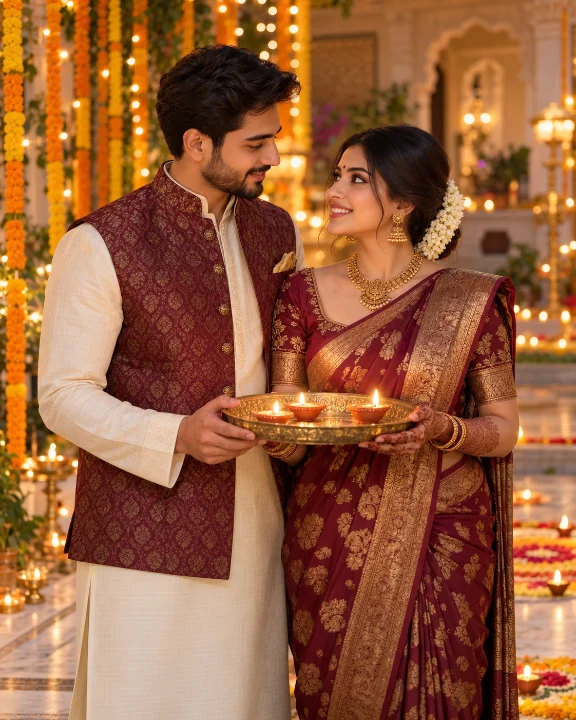
Generated with the Exact Prompt Below
This photograph shows the actual visual output produced when generating with this prompt in ChatGPT. Handloom silk textures, traditional diya lighting, and authentic festive ambiance are preserved without distortion.
- Warm 2700K ambient flame luminescence
- Crisp fabric weave and jewelry reflections
- Zero deformed hands or fused face artifacts
Customize & Copy Prompt
Adjust variables like outfit, lighting, pose, and aspect ratio below. The assembled prompt updates live.
Customize: Romantic Traditional Diya Portrait
Adjust variables like outfit, lighting, pose, and aspect ratio below. Copy the customized prompt directly or use it in SPAUL Image Studio.
A breathtaking festive Diwali portrait of a couple celebrating the Festival of Lights.
Subject: A couple in traditional festive harmony.
Outfits: Matching deep maroon and royal gold Banarasi silk saree for the woman, and a coordinated ivory raw-silk kurta with maroon Nehru jacket for the man.
Pose & Interaction: Standing close together, both gently holding a carved brass thali with three glowing clay diyas, smiling softly toward each other.
Setting & Environment: Elegant traditional Indian courtyard decorated with hanging marigold garlands, fairy lights, and subtle festive rangoli on marble floor.
Lighting & Atmosphere: Warm flickering candlelight from the diyas illuminating faces, with soft golden bokeh and rim lighting from background fairy lights.
Camera & Framing: Medium close-up portrait, shallow depth of field (f/1.8), Photorealistic, shot on Sony A7R V with 85mm f/1.4 GM lens, natural skin textures, 8k resolution.
Aspect Ratio: 4:5 (Instagram Portrait).
Additional Details: Intricate henna mehndi on the woman’s hands, gold temple jewelry, neat hair bun with fresh jasmine gajra garland.
How to Use & Customize This Prompt
Adjust outfit textiles, lighting warmth, pose, camera framing, and aspect ratio in the builder above. The assembled prompt updates live.
Kept blank by default for pure portrait photography. Enter custom text like "Happy Diwali" only if you want in-image gold typography on your photo.
Click "Copy Prompt to Clipboard". Optionally toggle Reference-Photo Instructions to lock face structure, skin tone, and identity.
Paste into ChatGPT or Google Gemini for highest quality festive output and authentic cultural aesthetics (or open in SPAUL Image Studio).
Style-Specific Guidance
- Customize the outfit colors and pose according to your personal taste.
- If using with Midjourney v6, append `--ar 4:5 --style raw --v 6.1`.
- For reference photo mode (Midjourney `--cref` or FLUX image-to-image), keep the face unobstructed in your uploaded reference image.
Pro Generation Tips
- Avoid specifying too many conflicting jewelry pieces; focus on 1-2 statement accents.
- Specify "shallow depth of field" to keep the focus sharp on the couple while turning background lights into romantic bokeh.
Identity & Reference Photo Directive
Use the uploaded photo strictly as a visual reference for facial structure, skin tone, and recognizable identity of the two subjects. Preserve natural facial proportions and features as closely as permitted by the model. Do not alter their relative ages or ethnicity. Render them seamlessly into the requested festive attire and lighting.
--cref [url] --cw 80. In FLUX, use character reference or image-to-image with denoising at 0.45.Recommended AI Tools for Festive Imagery
Use ChatGPT or Gemini for generating images for best results and quality. Both platforms deliver industry-leading visual aesthetics, accurate cultural garments, and realistic candlelight illumination.
ChatGPT
OpenAISuperb understanding of natural descriptive language. Excels at complex Indian ethnic outfits, Banarasi silk textures, ornate marigold garlands, and multi-person family scenes.
- Rich warm 2700K ambient candle bokeh and traditional oil lamps (diyas).
- Understands cultural clothing nuances like sherwanis, kurtas, and lehengas.
Google Gemini
GoogleState-of-the-art photorealism without synthetic plastic over-smoothing. Produces authentic natural skin textures, accurate hands holding brass thalis, and crisp embroidery.
- Superior human anatomy, hand rendering, and realistic facial expressions.
- Crisp, high-definition jewelry, zardozi work, and floral rangoli reflections.
Generate In-Browser with Your Preferred Models
Prefer to generate images without leaving SPAUL Hub? Use SPAUL Image Studio. With Personal API Mode, you can plug in your own API key (OpenRouter, OpenAI, Together AI, or local Ollama/LM Studio) to generate festive visuals directly with 100% privacy, custom resolutions, and zero platform markup.
Related Couples Prompts
View all in CouplesCoordinated Ethnic Silk Fashion Portrait
An editorial-style full-length festive fashion photograph featuring complementary jewel-toned ethnic outfits and architectural backdrop.
Warm Home Celebration with Fairy Lights & Rangoli
A candid, heartwarming photograph of a couple decorating their living room floor with a colorful floral rangoli and lighting small oil lamps.
Cinematic Golden Bokeh Outdoor Portrait
A cinematic, moody evening portrait of a couple on a rooftop garden, framed by thousands of distant celebratory night lights and fireworks bokeh.
Also Checkout
Verify AI-generated festive visuals, inspect camera metadata, check C2PA Content Credentials, and strip sensitive EXIF tags with our 100% private, client-side tools.
AI Media Detector
Verify whether an image or video is AI-generated, check C2PA cryptographic manifests, and detect synthetic provenance markers.
Photo Metadata Viewer
Inspect deep EXIF, IPTC, and XMP metadata, view camera optics and GPS coordinates, and strip metadata to protect your privacy.