Baroque Vampire Royalty in Gothic Ballroom
Dramatic and aristocratic 18th-century Baroque vampire nobleman in velvet and brocade inside an ornate candlelit castle ballroom.
Sample Image: Baroque Vampire Royalty in Gothic Ballroom
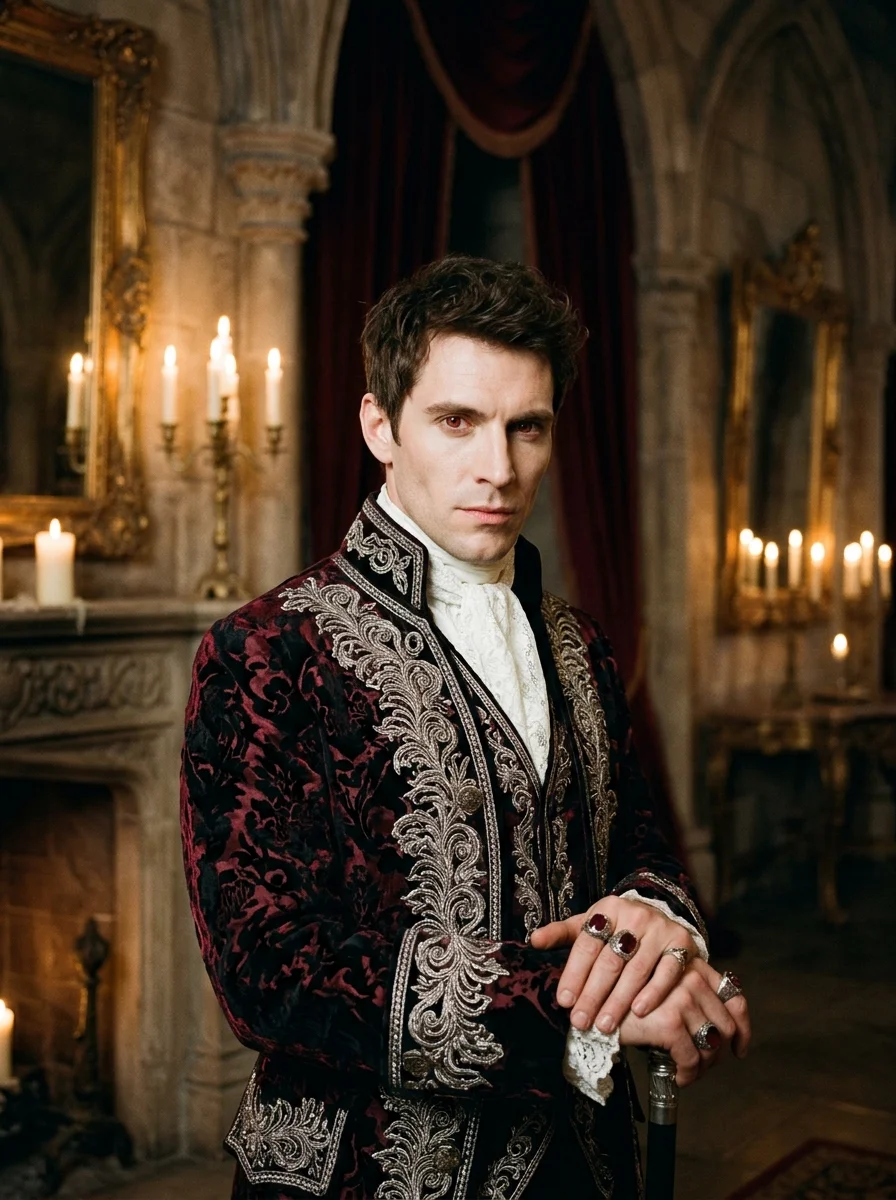
Generated with the Exact Prompt Below
This photograph shows the actual visual output produced when generating with this prompt in Google Gemini. Handloom silk textures, traditional diya lighting, and authentic festive ambiance are preserved without distortion.
- Warm 2700K ambient flame luminescence
- Crisp fabric weave and jewelry reflections
- Zero deformed hands or fused face artifacts
Customize & Copy Prompt
Adjust variables like outfit, lighting, pose, and aspect ratio below. The assembled prompt updates live.
Customize: Baroque Vampire Royalty in Gothic Ballroom
Adjust variables like outfit, lighting, pose, and aspect ratio below. Copy the customized prompt directly or use it in SPAUL Image Studio.
A stunning, ultra-realistic cinematic portrait of a handsome aristocratic vampire nobleman in an ornate 18th-century gothic ballroom. He wears a tailored midnight-crimson and black velvet frock coat with silver bullion embroidery, a high ruffled white silk cravat, an ornate antique silver brocade waistcoat, and intricate ruby signet rings on his fingers. He stands with aristocratic poise beside a grand stone fireplace, one hand resting on the back of a high-backed velvet throne, holding a crystal goblet filled with dark red vintage wine, his gaze piercing, regal, and composed. A grand European gothic castle ballroom with vaulted stone arches, tall arched stained-glass windows looking out onto a full moon and swirling fog, dripping silver candelabras with melted wax, and rich velvet drapery. Dramatic chiaroscuro candlelight from heavy multi-branch silver candelabras casting warm golden illumination on one side of his face and coat, while the other side is subtly rim-lit by cool silver moonlight. Medium-three-quarter portrait shot, Shot on Leica SL2 with APO-Summicron-SL 75mm f/2 ASPH, fine micro-contrast, deep cinematic blacks, painterly chiaroscuro aesthetic, --ar 3:4, 8k resolution, rich velvet micro-textures, intricate silver filigree details, atmospheric chiaroscuro mood.
How to Use & Customize This Prompt
Adjust outfit textiles, lighting warmth, pose, camera framing, and aspect ratio in the builder above. The assembled prompt updates live.
Kept blank by default for atmospheric Halloween photography. Enter custom text like "Happy Halloween" only if you want stylized vintage or neon typography rendered onto your image.
Click "Copy Prompt to Clipboard". Optionally toggle Reference-Photo Instructions to lock face structure, skin tone, and identity.
Paste into ChatGPT or Google Gemini for highest quality festive output and authentic cultural aesthetics (or open in SPAUL Image Studio).
Style-Specific Guidance
- Adjust the coat color (e.g. midnight-crimson, royal emerald, or pitch black with gold brocade).
- Paste into Midjourney v6, ChatGPT, or FLUX for an opulent, high-society gothic aesthetic.
- The dual lighting (warm candelabra + silver moonlight) produces stunning artistic contrast.
Pro Generation Tips
- Chiaroscuro lighting (Rembrandt style) elevates any vampire portrait into classical museum-grade art.
- Specifying "subtle refined canine elongation" avoids exaggerated cartoonish fake vampire teeth.
- Heavy materials like velvet and brocade give the image weight and authentic historical luxury.
Identity & Reference Photo Directive
Use a well-lit portrait with direct or slight three-quarter angle. With character reference tools, keep the expression composed and confident to match the regal aristocratic mood.
--cref [url] --cw 80. In FLUX, use character reference or image-to-image with denoising at 0.45.Recommended AI Tools for Festive Imagery
Use ChatGPT or Gemini for generating images for best results and quality. Both platforms deliver industry-leading visual aesthetics, accurate cultural garments, and realistic candlelight illumination.
ChatGPT
OpenAISuperb understanding of natural descriptive language. Excels at complex Indian ethnic outfits, Banarasi silk textures, ornate marigold garlands, and multi-person family scenes.
- Rich warm 2700K ambient candle bokeh and traditional oil lamps (diyas).
- Understands cultural clothing nuances like sherwanis, kurtas, and lehengas.
Google Gemini
GoogleState-of-the-art photorealism without synthetic plastic over-smoothing. Produces authentic natural skin textures, accurate hands holding brass thalis, and crisp embroidery.
- Superior human anatomy, hand rendering, and realistic facial expressions.
- Crisp, high-definition jewelry, zardozi work, and floral rangoli reflections.
Generate In-Browser with Your Preferred Models
Prefer to generate images without leaving SPAUL Hub? Use SPAUL Image Studio. With Personal API Mode, you can plug in your own API key (OpenRouter, OpenAI, Together AI, or local Ollama/LM Studio) to generate festive visuals directly with 100% privacy, custom resolutions, and zero platform markup.
Related Boys & Men Prompts
View all in Boys & MenAlso Checkout
Verify AI-generated festive visuals, inspect camera metadata, check C2PA Content Credentials, and strip sensitive EXIF tags with our 100% private, client-side tools.
AI Media Detector
Verify whether an image or video is AI-generated, check C2PA cryptographic manifests, and detect synthetic provenance markers.
Photo Metadata Viewer
Inspect deep EXIF, IPTC, and XMP metadata, view camera optics and GPS coordinates, and strip metadata to protect your privacy.